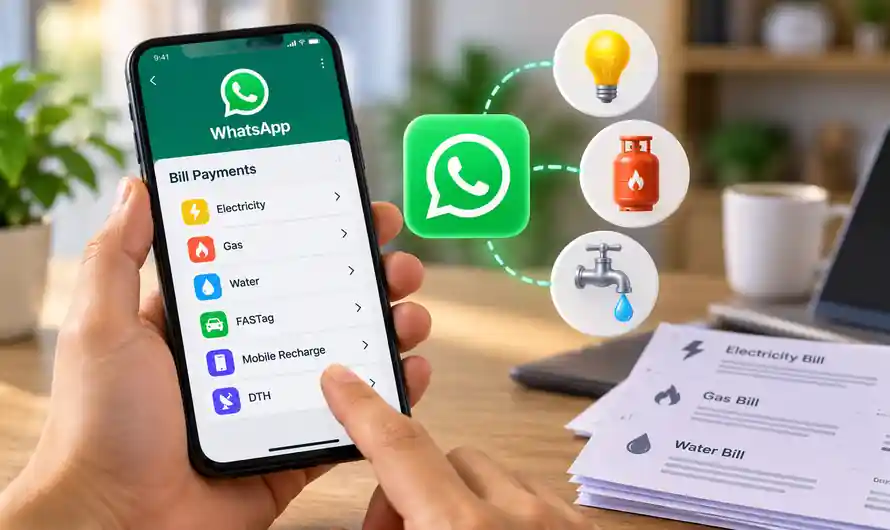
WhatsApp is expanding beyond messaging with a new WhatsApp Bill Payments feature in India. The new facility allows users to find, manage and pay several everyday bills directly inside WhatsApp. Electricity, water, gas, FASTag, insurance, credit card and loan payments are among the supported categories. The service is powered by the Bharat Connect network and covers 22,722 billers across 30 categories.
What is WhatsApp Bill Payments?
WhatsApp Bill Payments is a new in-app facility that brings everyday bill payments directly to the WhatsApp home screen. Instead of switching between different apps or websites, users can access supported billers through the ₹ payment icon in WhatsApp. The feature is being rolled out gradually across India for Android and iOS users, so it may not appear on every account immediately.
The new service is built on the Bharat Connect, formerly known as Bharat Bill Payment System or BBPS, network. According to Meta, the system provides access to 22,722 billers across 30 categories. This includes common household payments such as electricity, gas and water, along with FASTag, insurance, credit cards and loan repayments.
Which Bills Can You Pay on WhatsApp?
The new WhatsApp payment facility supports several categories of recurring household and financial payments. Users can pay electricity bills, water bills and gas bills, depending on whether their service provider is available in the supported biller network. Other categories include FASTag, insurance premiums, credit card bills and loan repayments.
WhatsApp also allows users to manage multiple accounts under the same biller. This can be useful for people who need to handle bills for their home, office or family members. Frequently used bill categories and previously used billers can also appear on the Payments Home screen, making repeat payments quicker.
How to Pay Electricity, Gas and Water Bills on WhatsApp
The process of using WhatsApp Bill Payments is relatively simple. Once the feature is available on your account, you can start the payment process directly from the WhatsApp home screen. You will need your relevant customer, consumer or account details to fetch the bill. Follow the steps below to check and pay your bill.
Step 1: Open WhatsApp
First, open the latest version of WhatsApp on your Android phone or iPhone. Go to the WhatsApp home screen and look for the ₹ icon at the top. This is the entry point for the Bill Payments facility. If you cannot see the ₹ icon or Bill Payments option, the feature may not have reached your account yet because the rollout is happening gradually across India.
Step 2: Tap the ₹ Payment Icon
After opening WhatsApp, tap the ₹ icon displayed at the top of the home screen. This will take you to the Payments section, where supported payment and bill-related options are displayed. From here, you can access the new bill payment facility and select the type of bill you want to pay. The interface is designed to keep the process inside WhatsApp without requiring another bill payment application.
Step 3: Select Your Bill Category
Next, choose the category of bill you want to pay. For example, you can select Electricity, Water or Gas, depending on the services available to you. WhatsApp also provides access to other supported categories such as FASTag, insurance, credit cards and loan repayments. Popular categories may appear directly on the Payments Home screen, while the See All option can be used to browse the wider list.
Step 4: Choose Your Service Provider
After selecting the bill category, choose your particular service provider or biller from the available list. The provider must be supported by the connected Bharat Connect network. For example, when paying an electricity bill, select the electricity board or provider associated with your connection. Choosing the correct biller is important because your account details need to match the information maintained by the service provider.
Step 5: Enter Your Account Details
Now enter the required consumer number, account number or other bill-related information requested by the selected provider. Check the details carefully before confirming them. WhatsApp can then fetch the available bill information from the biller. If the information does not match, the bill may not be retrieved, so make sure the account details are entered correctly before continuing with the payment.
Step 6: Check the Bill Amount
Once the bill is fetched, carefully review the displayed amount and other details before making the payment. This gives you an opportunity to confirm that the bill belongs to the correct account and that the amount shown is what you expect. WhatsApp’s new system can also display upcoming bills and previously paid billers, helping users manage recurring payments more conveniently from the Payments Home section.
Step 7: Select Your Payment Method
After verifying the bill, choose your preferred payment method. WhatsApp’s Bill Payments feature supports UPI, debit cards and credit cards, subject to the available payment options shown during the transaction. Select the method you normally use, enter the required payment information and proceed to the confirmation stage. Always verify the payment details before authorising the transaction.
Step 8: Confirm the Payment
Finally, confirm the transaction to complete your bill payment. Once the payment is successfully processed, keep the transaction confirmation or reference details for future use. Previously paid billers can appear on the Payments Home screen, making it easier to access them again during the next billing cycle. This can reduce the need to search for the same service provider every month.
What Makes WhatsApp Bill Payments Useful?
The biggest advantage of WhatsApp Bill Payments is convenience. Many people already use WhatsApp every day, so having electricity, water and gas payments available inside the same application can reduce the need to switch between multiple apps. The ability to manage multiple accounts under one biller is also useful for families, offices and users handling payments for more than one property.
Another useful feature is the Payments Home experience, where previously used billers and commonly used categories can be surfaced for quicker access. WhatsApp says bills can be pre-fetched, while users can also view past payments and upcoming bills. The feature is therefore designed not only for making individual payments but also for managing recurring household bills from one place.
When Will WhatsApp Bill Payments Be Available?
WhatsApp has started rolling out the new Bill Payments service gradually across India. The company says it will become available to Android and iOS users across the country over the coming weeks. Therefore, if the feature is not visible on your WhatsApp account yet, you may need to wait for the rollout to reach your account. Keeping WhatsApp updated can also help ensure you have the latest available features.
Final Words
With WhatsApp Bill Payments, paying everyday bills is becoming more convenient for Indian users. Electricity, gas and water bills can now be managed alongside several other payment categories without leaving the messaging app. The integration with Bharat Connect gives access to a large network of billers, while features such as multiple accounts, past payments and frequently used billers can make recurring payments easier.
Official information: Meta India – WhatsApp Bill Payments announcement
Internal Link List — Copyglue
- WhatsApp New Features 2025 (Copyglue)
- Navi UPI Features & Cash Rewards (Copyglue)
- UPI Daily Transaction Limit 2026 (Copyglue)
- UPI AutoPay App-Wise Guide 2026 (Copyglue)
- Wrong UPI Payment Sent? How to Get Money Back (Copyglue)
- Bank Server Down Today (Copyglue)
- New Electricity Connection Online in Kerala 2026 (Copyglue)