A cheque bounce can create stress, delays, and even legal trouble if not addressed quickly. Whether you’re a salaried employee waiting for a reimbursement, a business owner receiving payments, or an individual dealing with rent or fees, knowing how to check cheque bounce status online helps you act fast.
In many cases, people are unsure whether a cheque has cleared, is pending, or has been returned. Thankfully, Indian banks now offer multiple digital and offline ways to track cheque status in real time.
This guide explains everything step by step—no banking jargon, no confusion.
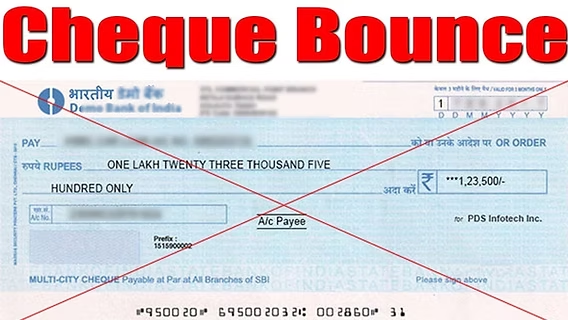
What Is a Cheque Bounce?
A cheque bounce (also called cheque return) happens when a bank refuses to process a cheque and sends it back unpaid.
In simple terms:
- The cheque is presented to the bank
- The bank cannot process it
- The cheque amount is not credited
- The cheque is marked as Returned / Dishonoured
Why banks return cheques:
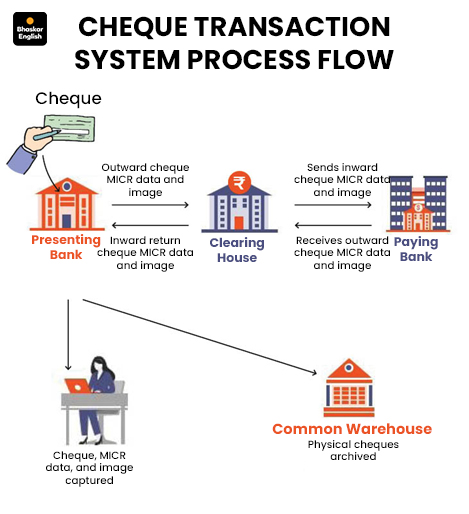
Banks follow clearing rules set by Reserve Bank of India. If a cheque fails to meet required conditions, it is returned with a reason code.
Common Reasons for Cheque Bounce
Here are the most frequent causes in India:
- Insufficient balance in the issuer’s account
- Signature mismatch with bank records
- Post-dated or stale cheque (validity expired)
- Overwriting or damaged cheque
- Account closed or frozen
- Stop payment instruction issued by the account holder
How to Check Cheque Bounce Status Online
Method 1: Through Bank Internet Banking
Most banks allow cheque status tracking via net banking.
Steps:
- Log in to your bank’s internet banking portal
- Go to Account Statement / Transaction History
- Look for the cheque entry using date or amount
- Check status:
- Cleared – payment successful
- Pending – under clearing
- Returned / Failed – cheque bounced
- Click details to view the return reason code
✅ Best method if you already use net banking.
Method 2: Using Bank Mobile App
Bank mobile apps provide faster access than websites.
Steps:
- Open your bank’s mobile app
- Select your savings/current account
- Go to transaction history
- Find the cheque transaction
- Check remarks such as:
- Cheque Returned
- Funds Insufficient
- Signature Differs
📱 Ideal for quick checks in 2026.
Method 3: SMS & Email Alerts
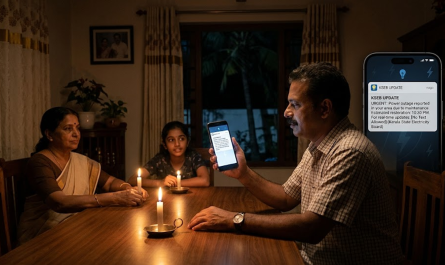
Most banks automatically send alerts.
How it works:
- When a cheque is cleared or bounced, the bank sends:
- SMS
- Email notification
Typical messages:
- “Cheque No. 458921 has been returned due to insufficient funds.”
- “Cheque dishonoured. Please contact your bank.”
📌 If you receive such a message, the cheque has bounced.
Method 4: By Contacting Bank Customer Care
If you don’t use digital banking:
You’ll need:
- Cheque number
- Cheque date
- Amount
- Account number
Process:
- Call customer care or visit branch
- Ask for cheque clearing status
- Bank staff confirms whether it’s cleared or returned
Understanding Cheque Return Memo & Reason Codes
What is a Cheque Return Memo?
It is an official document issued by the bank explaining why a cheque was returned.
Common Reason Codes:
- Funds Insufficient
- Drawer Signature Differs
- Account Closed
- Payment Stopped by Drawer
- Cheque Out of Date
Why it’s important:
- Required for re-deposit
- Mandatory for legal action
- Proof of cheque dishonour
What to Do After a Cheque Bounces
- Inform the cheque issuer immediately
- Re-deposit the cheque (if the bank allows)
- Collect the return memo
- If payment fails again:
- Legal notice can be issued under Section 138 of the Negotiable Instruments Act
- Be aware of bank bounce charges
⚠️ Legal action is time-bound, so act quickly.
Cheque Bounce Charges & Penalties
- Issuer (drawer) usually pays penalty
- Receiver may also be charged in some banks
- Charges differ for:
- Savings accounts
- Current/business accounts
- Fees vary by bank (exact amounts not fixed industry-wide)
Important Tips to Avoid Cheque Bounce
- Maintain sufficient balance
- Write cheques clearly and neatly
- Avoid overwriting
- Check cheque validity date
- Match signature with bank records
- Prefer UPI, IMPS, or NEFT for faster payments in 2026
Frequently Asked Questions (FAQs)
Can I check cheque bounce status without internet banking?
Yes. Use SMS alerts, email, or customer care.
How long does it take to know if a cheque bounced?
Usually 1–3 working days after deposit.
Is cheque bounce a criminal offence?
It can become a legal offence if payment is not made after formal notice.
Can a bounced cheque be deposited again?
Yes, if the reason is correctable (like insufficient balance).
Conclusion
Tracking cheque bounce status online in India is now simple and fast. With net banking, mobile apps, and instant alerts, you no longer need to wait or visit branches unnecessarily.
In 2026, digital banking offers:
- Faster updates
- Better transparency
- Safer alternatives to paper cheques
Still using cheques? Make sure you track every transaction and switch to digital payments whenever possible.
WhatsApp Text to Sticker Feature 2026 – Convert Your Words into Stickers
Dodge N Wolves Borosilicate Glass Kettle Jug Review 2026 – Best 1L Glass Jug in India