Many people want to stop WhatsApp messages and calls temporarily, Disable WhatsApp Only without switching off mobile data or Wi-Fi. Turning off the internet affects all apps, which is often not what users want.
The good news is that WhatsApp has a built-in Proxy setting that can be used to disable WhatsApp only, while the internet continues to work normally for other apps like YouTube, Google, or browsers.
We explain this method step by step in very simple language.
What Happens When You Disable WhatsApp Using Proxy?
When you use the proxy method:
- Internet works normally for all other apps
- WhatsApp stops connecting to the internet
- Messages and calls do not come through
- The method is fully reversible anytime
This means you can pause WhatsApp without disturbing anything else on your phone.
Step-by-Step Guide to Turn Off WhatsApp Only
Follow these simple steps carefully:
Step 1: Open WhatsApp
Open the WhatsApp app on your phone.
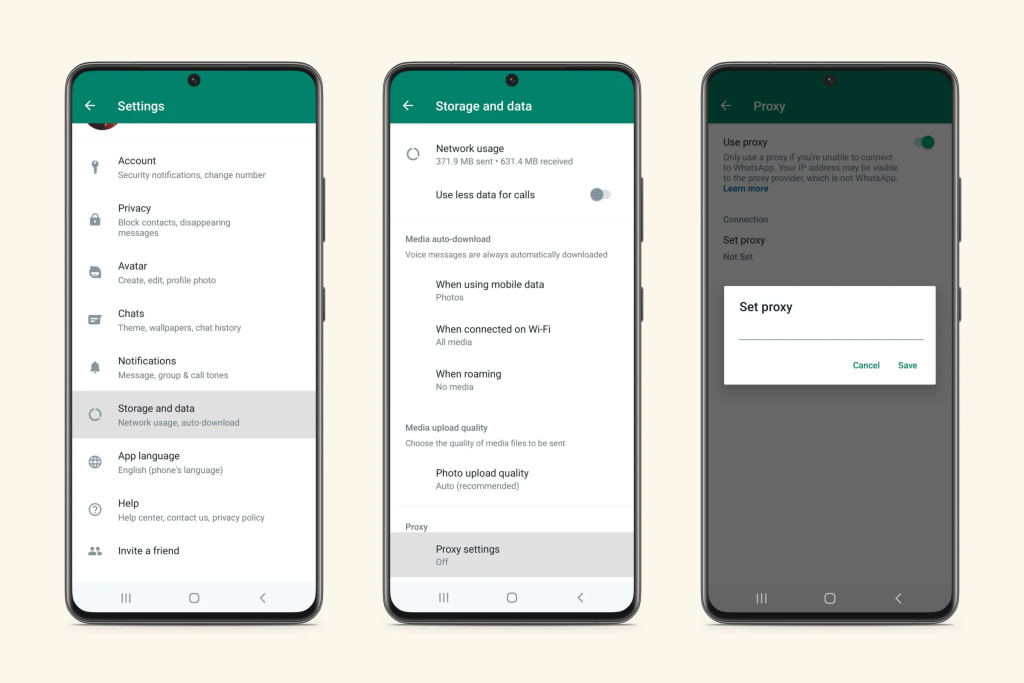
Step 2: Go to Settings
Tap the three dots (⋮) in the top-right corner and select Settings.
Step 3: Tap on “Storage and Data”
Inside Settings, tap Storage and Data.
Step 4: Select “Proxy”
Scroll down and tap on Proxy.
Step 5: Tap “Set up Proxy”
Now tap Set up Proxy.
Step 6: Enter Proxy Host
In the Proxy Host field, type exactly:
1.1.1.1
Step 7: Tap the ✔ Tick Button
Tap the ✔ (tick) button to save.
📌 After this, WhatsApp will show “Connecting…” or “No connection”.
This means WhatsApp is disabled, but your internet is still ON for other apps.
How to Turn WhatsApp Back ON
To enable WhatsApp again:
- Open WhatsApp → Settings
- Go to Storage and Data → Proxy
- Turn OFF Proxy
WhatsApp will reconnect instantly and start working normally.
When Is This Method Useful?
This trick is helpful when you want to:
- 📚 Study or work without WhatsApp distractions
- 📞 Avoid WhatsApp calls temporarily
- 🧘 Take a short digital break
- ⏳ Save focused time without uninstalling the app
Important Things to Know
- This method does NOT delete chats or data
- There is no risk to your WhatsApp account
- Works best on Android phones
- On iPhone, proxy controls may be limited or unavailable
Common Issues & Fixes
Problem: WhatsApp is still working
✔ Check if proxy is properly enabled and saved
Problem: WhatsApp not reconnecting
✔ Go to Proxy settings and turn proxy OFF
Problem: Proxy option not visible
✔ Update WhatsApp to the latest version
Is This Method Safe?
Yes, this method is safe because:
- It uses WhatsApp’s own built-in feature
- No third-party apps are required
- No extra permissions are needed
- No data or privacy risk involved
Conclusion
Using the WhatsApp proxy method is a smart, safe, and reversible way to disable WhatsApp only, without turning off mobile data or Wi-Fi.
If you want peace, focus, or a short break—this method lets you pause WhatsApp without affecting other apps or your internet connection.
WhatsApp Text to Sticker Feature 2026 – Convert Your Words into Stickers
Dodge N Wolves Borosilicate Glass Kettle Jug Review 2026 – Best 1L Glass Jug in India