
A Domicile Certificate is an official document that proves a person is a permanent resident of Kerala. It is often required for:
- Government job applications
- Educational admissions under state quota
- Reservation benefits
- Scholarship applications
- State government schemes
Earlier, applicants had to visit local offices multiple times. Now, Kerala residents can apply online through the official government portal, reducing paperwork and saving time.
What Is a Domicile Certificate in Kerala?
A domicile certificate confirms that a person legally belongs to Kerala as their permanent state of residence.
It is important to understand the difference between related certificates:
1. Domicile Certificate
Confirms permanent residency in Kerala. Used for state-level benefits and employment.
2. Nativity Certificate
Confirms that a person was born in Kerala or has ancestral roots in the state.
3. Residence Certificate
Confirms that a person is currently living at a particular address in Kerala.
Each document serves a different purpose. For government jobs and state quota admissions, a domicile certificate is usually required.
Official Portal to Apply Online
Kerala’s Local Self Government Department (LSG) provides online services through the KSMART portal.
Official website:
🏛️ Visit K-Smart Portal
Applications are processed by:
- Grama Panchayats
- Municipalities
- Corporations
Citizens can apply digitally, and the concerned local body verifies the details before approval.
Documents Required for Domicile Certificate
Before applying, keep these documents ready:
- Aadhaar Card
- Ration Card
- Voter ID
- Birth Certificate (if required)
- Address proof (electricity bill, rental agreement, etc.)
- Passport size photo
- Self-declaration (if required)
Ensure that scanned copies are clear and readable. Blurred or incomplete documents may lead to rejection.
Step-by-Step Guide to Apply for Domicile Certificate Online in Kerala

Applying for a Domicile Certificate Kerala Online has become much easier through the official KSMART portal. This detailed guide explains every step clearly so that students, job applicants, and residents can complete the process without confusion.
Before You Start: Important Preparation
Before visiting the portal, make sure you:
- Have a valid mobile number (linked to Aadhaar is recommended)
- Keep scanned copies of required documents ready
- Use a stable internet connection
- Preferably use a desktop or laptop for easier navigation
Keep documents in PDF or JPG format and ensure they are clear and readable.
Official portal:
Step 1: Visit the Official KSMART Portal
- Open your web browser (Chrome, Edge, Firefox recommended).
- Type the official website: 🏛️ Visit K-Smart Portal
- Wait for the homepage to load fully.
- Choose your preferred language if the option is available.
Make sure you are on the official government website to avoid fraud.
Step 2: Register as a New User (If First Time)
If you are applying for the first time:
- Click on Citizen Login.
- Select New User Registration.
- Enter your mobile number.
- You will receive an OTP (One-Time Password).
- Enter the OTP to verify.
- Create a password for future login.
After successful registration, your account will be created.
If you already have an account, simply log in.
Step 3: Login to Your Dashboard
- Enter your registered mobile number.
- Enter your password.
- Click Login.
- You will be redirected to your citizen dashboard.
The dashboard shows available services and application history.
Step 4: Select Certificate Services
- Look for the section labeled Certificate Services.
- Click on it.
- A list of available certificates will appear.
This section includes services like birth certificate, death certificate, residence certificate, and domicile certificate.
Step 5: Choose Domicile / Residence Certificate
- Select Domicile Certificate (or Residence Certificate if applicable).
- Click Apply Now.
Read the instructions carefully before proceeding.
Step 6: Fill Personal Details Carefully
You will now see an online application form.
Enter:
- Full Name (as per Aadhaar)
- Father’s / Mother’s Name
- Date of Birth
- Gender
- Permanent Address
- Local Body (Panchayat / Municipality / Corporation)
- Aadhaar Number (if required)
- Purpose of certificate (education, job, scholarship, etc.)
Important:
- Ensure spelling matches your official documents.
- Double-check your address details.
- Do not leave required fields blank.
Mistakes in personal details may cause rejection.
Step 7: Upload Required Documents
Now upload scanned copies of required documents:
Common documents include:
- Aadhaar Card
- Ration Card
- Voter ID
- Birth Certificate (if needed)
- Address Proof
- Passport size photo
- Self-declaration (if required)
Make sure:
- Documents are clear and not blurred.
- File size meets portal requirements.
- Upload the correct document in the correct field.
Uploading wrong or unclear files is one of the main reasons for rejection.
Step 8: Review Application Before Submission
Before submitting:
- Recheck all personal details.
- Verify uploaded documents.
- Confirm local body selection.
- Ensure mobile number is correct.
Take your time to review everything carefully.
Step 9: Pay Application Fee
After reviewing:
- Click Proceed to Payment.
- Pay the required application fee (usually ₹20–₹50 depending on local body).
- Use available online payment methods.
- Save the payment receipt or take a screenshot.
Do not refresh the page during payment.
Step 10: Submit Application
After successful payment:
- Click Submit.
- The system will generate an Application Number or Reference ID.
- Note down this number carefully.
- You may also receive SMS confirmation.
This number is important for tracking status later.
Step 11: Application Verification Process
After submission:
- The application is forwarded to the respective Panchayat / Municipality / Corporation.
- Officials verify your documents.
- In some cases, field verification may be conducted.
Verification usually takes 5–10 working days.
Step 12: Track Application Status
To check progress:
- Login to KSMART portal.
- Click Track Application.
- Enter your Application Number.
- View status such as:
- Submitted
- Under Verification
- Approved
- Rejected
If rejected, the reason will be mentioned.
Correct the issue and reapply if needed.
Step 13: Download Domicile Certificate Online
Once approved:
- Login to your account.
- Go to My Applications.
- Find your approved application.
- Click Download Certificate.
- Save the certificate as PDF.
You can print it if required.
The digitally signed certificate is valid for official use.
What Happens If Application Is Rejected?
Common reasons:
- Incorrect personal details
- Mismatch in address proof
- Blurred document uploads
- Incomplete form
Solution:
- Correct errors.
- Reapply with proper documents.
- Contact local body office if needed.
How to Track Application Status
You can check your application progress online:
- Login to the KSMART portal
- Click on “Track Application”
- Enter your application/reference number
- View status such as:
- Submitted
- Under Verification
- Approved
- Rejected
If rejected, the reason will usually be mentioned.
How to Download Domicile Certificate Online
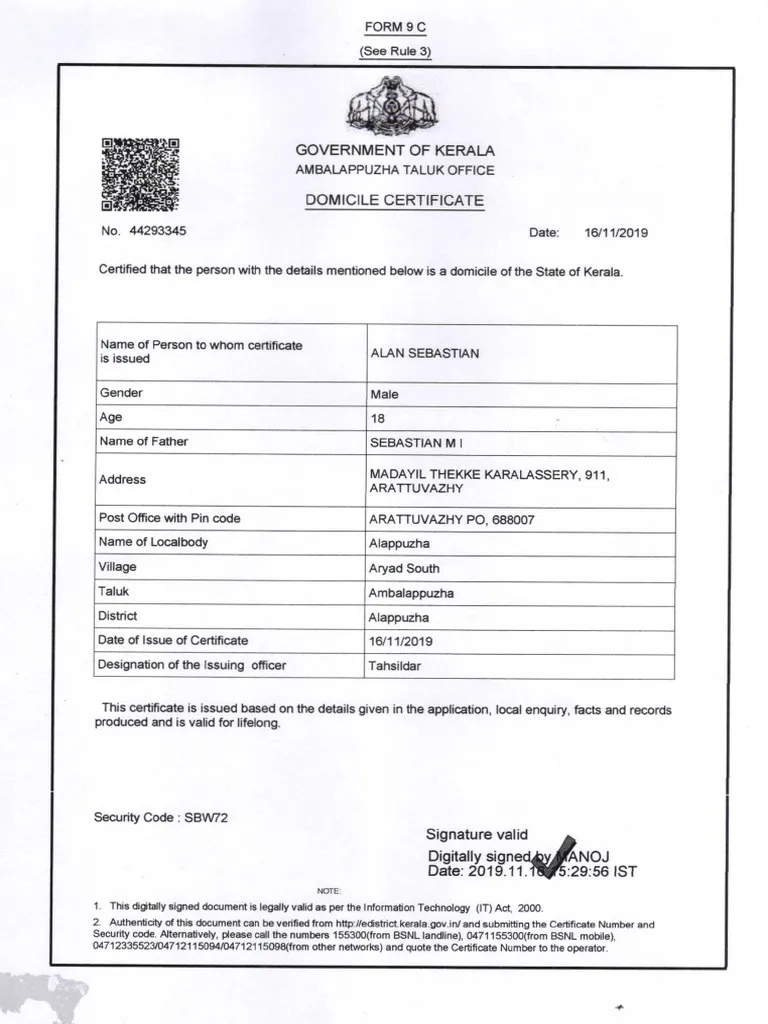
Once your application is approved:
- Login to your KSMART account
- Go to “My Applications”
- Click on the approved certificate
- Select “Download Certificate”
- Save the file as PDF
You can print the certificate if required. Digitally signed certificates issued through the portal are valid for official purposes.
Processing Time
The typical approval timeline is 5–10 working days, depending on verification by the local body authority.
Delays may occur if:
- Documents are unclear
- Additional verification is required
- Local office workload is high
Common Problems & Solutions
Here are common issues applicants face:
Application Rejected
Ensure documents are clear and information matches official records.
Status Showing Pending
Wait for local verification. Contact your local body if delay exceeds expected time.
Certificate Not Downloading
Try using a different browser or clearing browser cache.
Payment Not Reflected
Check transaction history and wait for confirmation. If needed, contact support.
FAQs
1. Is domicile certificate and nativity certificate same in Kerala?
No. Domicile confirms permanent residency, while nativity confirms origin or birth in Kerala.
2. Can students apply online?
Yes. Students can apply through the KSMART portal.
3. Is online certificate valid?
Yes. Digitally signed certificates are legally valid.
4. What if application is rejected?
Correct the issue mentioned and reapply. You may also contact the local body office.
5. Can I download domicile certificate again later?
Yes. You can access it from your account dashboard anytime.
Visit the Official KSMART Portal
Conclusion
Applying for a Domicile Certificate Kerala Online is now simple through the KSMART portal. The digital process reduces the need for office visits and speeds up approval.
By keeping documents ready and following the step-by-step instructions carefully, Kerala residents can apply, track, and download their domicile certificate from home. This online system supports students, job seekers, and beneficiaries of government schemes with greater convenience and transparency.


