
Smartphone users today want their devices to feel personal and unique, not just functional. One of the most popular ways to customize a phone is by changing app icons and app names on the home screen. This allows users to create themed layouts, minimalist designs, or simply make apps easier to recognize.
The X Icon Changer app is designed to help users customize app icons and names easily—without technical steps like rooting or jailbreaking. In 2026, it remains a practical tool for users who want more control over how their Android or iPhone home screen looks.
What Is X Icon Changer App?
X Icon Changer is a mobile customization app that lets users:
- Change how app icons look
- Rename apps on the home screen
- Create shortcuts with custom images
It works on both Android and iOS, though the way it functions differs slightly on each platform due to system restrictions.
Official Sources
- Android version is available on Google Play Store
- iOS version is available on Apple App Store
Unlike built-in customization options, X Icon Changer gives greater flexibility, especially for apps that normally cannot be renamed or re-themed.
Features of X Icon Changer
X Icon Changer focuses on simple but effective customization features.
Key Capabilities
- Change app icons using:
- Gallery photos
- Downloaded images
- Built-in icon packs
- Customize app names (home screen display name)
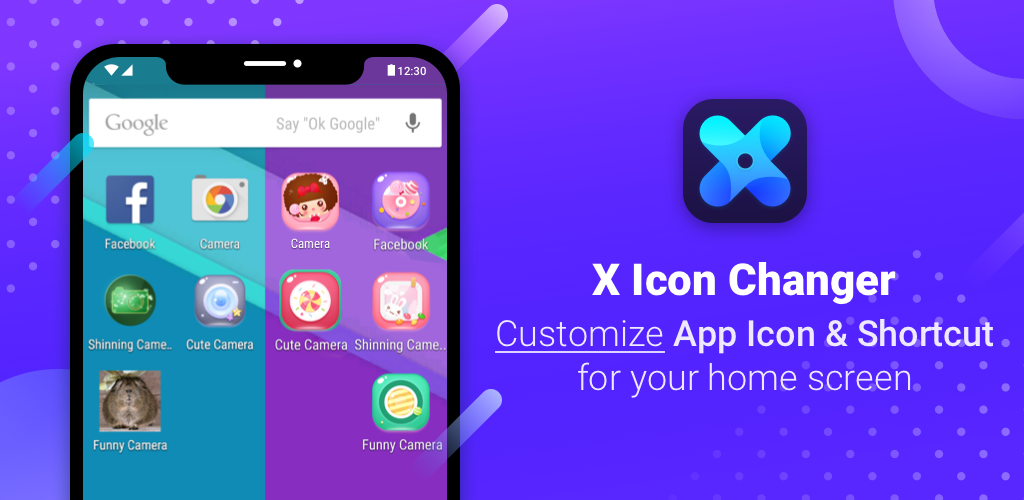
- Create themed home screens (dark, pastel, minimal, etc.)
- No root (Android) and no jailbreak (iOS) required
- Works with most Android launchers and standard iOS layouts
These features make it suitable for beginners as well as users who enjoy detailed visual customization.
How App Icons Work on Smartphones
What Are App Icons?
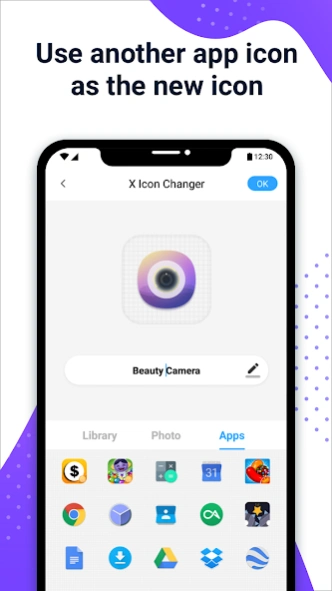
App icons are visual shortcuts that launch apps. Changing an icon does not change the app itself, only how it appears on your home screen.
Android vs iOS Handling
- Android: Allows apps to create custom shortcuts more freely
- iOS: Uses the Shortcuts system to create icon replacements
Because of these limitations, a third-party app like X Icon Changer acts as a bridge to enable icon and name changes safely.
Step-by-Step: How to Use X Icon Changer on Android
Step 1: Download & Install
- Open Google Play Store
- Search for X Icon Changer
- Tap Install
Step 2: Open the App
- Launch X Icon Changer
- You will see a list of installed apps
Step 3: Allow Necessary Permissions
The app may ask for:
- Permission to create shortcuts
- Access to photos (if you want gallery icons)
These permissions are required for icon customization.
Step 4: Select the App You Want to Customize
- Tap on the app from the list
- This opens the customization screen
Step 5: Choose a New Icon
You can:
- Select an icon from built-in packs
- Upload an image from your gallery
- Use downloaded icon images
Step 6: Enter a New App Name (Optional)
- Edit the app name shown on the home screen
- You can shorten names or use custom labels
Step 7: Save and Add to Home Screen
- Tap OK / Save
- The customized app shortcut appears on your home screen
The original app remains unchanged in the app drawer.
Useful Android Tips
- Resize icons using launcher settings
- Use consistent icon packs for a clean look
- Keep backup images of your favorite icons
Step-by-Step: How to Use X Icon Changer on iPhone
Due to iOS restrictions, icon changes work slightly differently.
Step 1: Install from App Store
- Open Apple App Store
- Search for X Icon Changer
- Install the app
Step 2: Open the App
- Launch X Icon Changer
- Choose the app you want to customize
Step 3: Pick or Upload an Icon
- Choose from built-in icons or gallery images
Step 4: Change App Name (Optional)
- Enter the name you want to appear on the home screen
Step 5: Add Shortcut to Home Screen
- The app creates a shortcut
- The custom icon appears on the home screen
- The original app may still remain in the App Library
Note: iOS customization relies on shortcuts, so the icon is technically a shortcut, not a direct icon replacement.
Best Practices for Custom Icons
To get the best visual results:
- Use high-resolution square images
- Choose readable colors and simple designs
- Keep icon styles consistent across apps
- Avoid clutter by grouping similar apps
Consistency makes the home screen look professional and clean.
Common Problems & Solutions
Icon not updating
- Remove old shortcut and recreate it
- Restart the phone
App name change not saving
- Ensure shortcut creation permission is enabled
Permissions not granted
- Go to phone settings → Apps → X Icon Changer → Permissions
Broken shortcuts
- Recreate the shortcut after app updates
Safety & Privacy Tips
- Download only from official app stores
- Do not grant unnecessary system-level permissions
- Avoid unknown third-party icon packs
- Keep the app updated for compatibility
X Icon Changer does not modify app functionality—it only affects visual shortcuts.
Comparison With Built-In Customization
Android Launchers
- Some launchers allow icon packs and renaming
- X Icon Changer helps when launcher options are limited
iOS Shortcuts
- iOS allows basic customization via shortcuts
- X Icon Changer simplifies and organizes this process
A third-party app is useful when built-in tools feel restrictive.
Who Should Use This App?
X Icon Changer is ideal for:
- Users who enjoy customized phone themes
- Students and younger users
- Bloggers and content creators
- Productivity-focused users who organize apps visually
It is not required for basic phone usage, but helpful for personalization.
FAQs
Can this change app functionality?
No. It only changes icons and names on the home screen.
Does it affect notifications?
No. Notifications continue from the original app.
Can icons revert after updates?
Sometimes. You may need to recreate shortcuts after major updates.
Is the app free?
Basic features are usually free; some icon packs may be optional.
Official download links for the X Icon Changer app on Android and iOS
Conclusion
The X Icon Changer app offers a simple and flexible way to personalize your smartphone’s appearance in 2026. By allowing users to change app icons and names without technical risks, it makes customization accessible even to beginners.
Whether you use Android or iPhone, X Icon Changer helps you create a home screen that feels organized, visually pleasing, and personal—without affecting how your apps actually work.


