In India, the mobile number linked with a vehicle’s Registration Certificate (RC) plays a crucial role in accessing transport-related services. From receiving OTPs for online services to getting SMS alerts for traffic challans, insurance reminders, and ownership updates, an active mobile number is essential.
If the mobile number linked to your RC book is outdated or inactive, you may face difficulties while using online vehicle services. Therefore, we strongly recommend that all vehicle owners update mobile number in RC whenever their contact details change. The Government of India provides a secure online facility through the Parivahan portal to complete this task easily.
What Is RC Book Mobile Number Update?
Meaning of RC mobile number linking
RC mobile number linking refers to associating an active mobile number with a vehicle’s registration details stored in the government database.
Why keeping an updated number is mandatory
An updated mobile number ensures uninterrupted access to Parivahan services and official communication from transport authorities.
Services affected if mobile number is outdated
- OTP-based online services
- Traffic challan notifications
- Vehicle transfer and address updates
- Insurance and permit-related alerts
This is why RC book mobile number update online is important for every vehicle owner.
Who Can Update Mobile Number in RC Online?
The online facility is available for:
- Individual vehicle owners
- Two-wheeler owners
- Four-wheeler owners
- Private vehicle registrations
Commercial vehicles or special cases may require offline verification at the RTO.
Official Website to Update RC Mobile Number Online
The only official portal to change mobile number in RC book is:
Parivahan Official Portal
This portal is operated by the Ministry of Road Transport and Highways.
⚠️ Citizens should avoid fake or third-party websites claiming instant RC updates or charging unnecessary fees.
Documents / Details Required
To complete the Parivahan RC mobile update, keep the following ready:
- Vehicle registration number
- Chassis number or engine number
- New active mobile number
- Aadhaar (if required for verification)
No physical documents are required for the online process.
How to Update Mobile Number in RC Book Online – Step-by-Step Guide
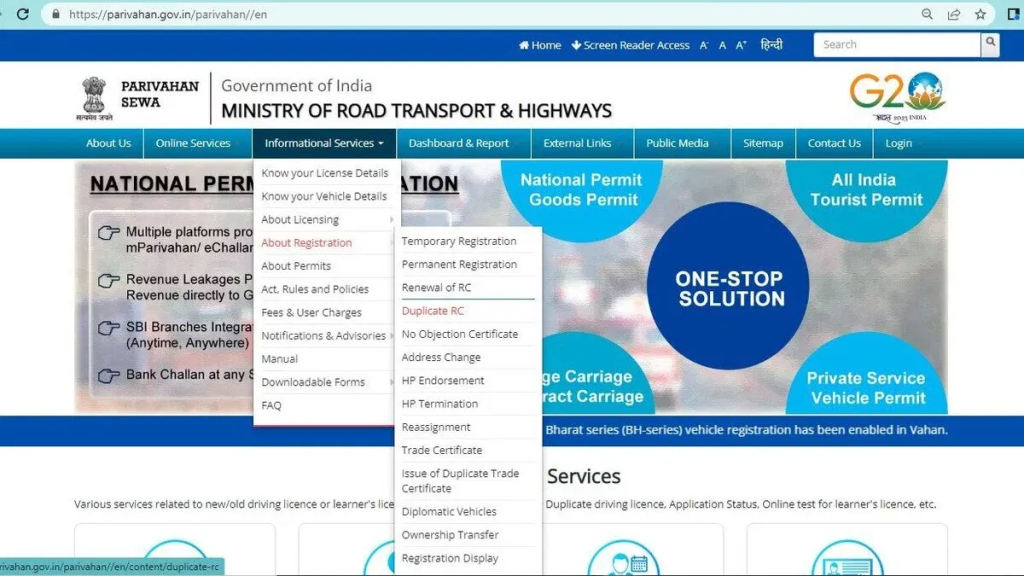
Follow these steps carefully to update mobile number in RC book online:
Step 1: Visit the Parivahan official website
Open parivahan.gov.in in your browser.
Step 2: Click on “Online Services”
Select the option from the homepage menu.
Step 3: Select “Vehicle Related Services”
This will redirect you to vehicle service options.
Step 4: Enter your vehicle registration number
Provide the RC number exactly as mentioned in the RC book.
Step 5: Choose “Update Mobile Number” option
Select the service from the available list.
Step 6: Enter the new mobile number
Carefully enter the mobile number you want to link.
Step 7: Verify using OTP
An OTP will be sent to the new mobile number.
Step 8: Submit the request
After successful OTP verification, submit the request.
Once completed, the vehicle RC mobile number change request is registered.
Is There Any Fee for RC Mobile Number Update?
- In most cases, no fee is charged for updating the mobile number
- The service is provided directly through Parivahan
- No agent or middleman is required
If any fee is applicable, it will be shown clearly on the official portal.
How Long Does It Take for the Update to Reflect?
- Updates usually reflect immediately or within a few hours
- In some cases, it may take 1–2 working days
- SMS confirmation is sent once the update is successful
Common Problems & Solutions
OTP not received
- Check mobile network
- Retry after some time
Vehicle details not found
- Verify RC number format
- Check state code and digits
Mobile number already linked
- Ensure the number is not already registered
Server or technical errors
- Try during non-peak hours
- Use a different browser or device
Most Parivahan RC mobile update issues are temporary.
Offline Method to Update Mobile Number in RC (If Online Fails)
If online update is not possible:
- Visit the nearest RTO
- Carry RC book and ID proof
- Submit a written request
Offline method is required mainly for older records or data mismatches.
Benefits of Updating Mobile Number in RC
- Instant SMS alerts from Parivahan
- Easy access to online vehicle services
- Traffic challan and enforcement notifications
- Smooth ownership and insurance services
Keeping your RC-linked mobile number updated ensures hassle-free vehicle management.
Frequently Asked Questions (FAQs)
Can we update mobile number without Aadhaar?
Yes, Aadhaar is not mandatory in all cases.
Can one mobile number be linked to multiple vehicles?
Yes, a single mobile number can be linked to multiple RCs.
Is RC mobile update mandatory?
Yes, for receiving official alerts and using online services smoothly.
Conclusion
Updating the mobile number linked with your RC book is a simple but essential task for every vehicle owner in India. By using the official Parivahan portal, we can complete the RC book mobile number update online safely, quickly, and without visiting the RTO. We strongly encourage all vehicle owners to keep their RC-linked mobile number updated to avoid service disruptions, missed notifications, and future complications.