
Public transport has changed significantly in recent years. Earlier, bus passengers depended only on printed timetables or guesswork while waiting at bus stops. This often led to long waiting times, missed buses, and uncertainty—especially during peak hours or long-distance travel.
With KSRTC Live Bus Tracking App, commuters can now see the real-time location of buses, estimate arrival times, and plan journeys more confidently. In Kerala, this is especially useful for buses operated by Kerala State Road Transport Corporation (KSRTC), which runs services across cities, towns, and long inter-district routes.
This guide explains how Android and iOS users can track KSRTC buses live, step by step, using commonly used tracking apps in 2026.
What Is Live Bus Tracking?
Live bus tracking is a system that shows the current location of a bus on a map in real time.
How It Works
- Buses are equipped with GPS devices
- Location data is sent using mobile networks
- Apps display the bus position, movement, and estimated arrival time
Why It’s Better Than Timetables
- Timetables show only scheduled times
- Live tracking shows actual movement
- Delays due to traffic, weather, or road conditions are reflected
Why Use a Live Bus Tracking App
Using a live tracking app offers practical benefits for everyday travel.
Key Advantages
- Know exact arrival time at your stop
- Avoid unnecessary waiting
- Plan connections and transfers
- Useful for long-distance KSRTC routes
- Helps travelers unfamiliar with local routes
For students, office-goers, and daily commuters, this means less stress and better time management.
Official & Widely Used Apps for KSRTC Live Tracking
While KSRTC does not rely on a single exclusive tracking app for all users, several trusted public transport apps are widely used in Kerala and across India.
Popular Options
Android – Zophop
Zophop is commonly used by Android users to track buses, including KSRTC routes, in many Indian cities.
iOS & Android – Chalo
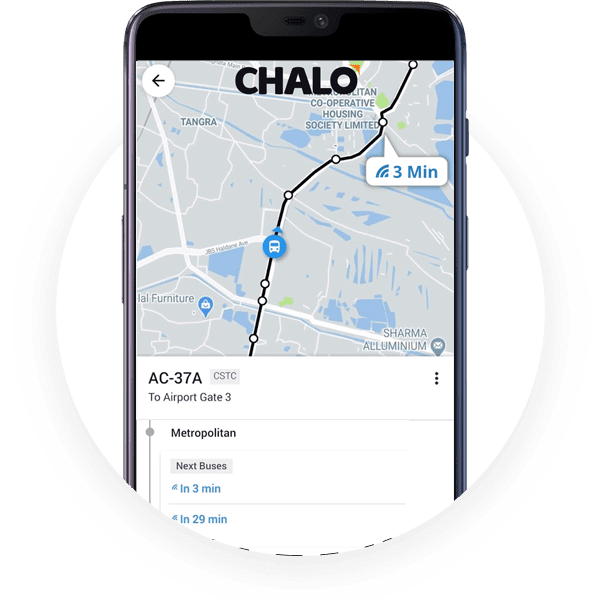
Chalo provides live bus tracking, ETA updates, and route information on supported routes and cities.
Availability of live tracking depends on route coverage and GPS data availability.
Step-by-Step: How to Track KSRTC Buses on Android (Using Zophop)
Step 1: Install the App
- Open Google Play Store
- Search for Zophop
- Install and open the app
Step 2: Allow Location Access
- Allow location permission for accurate nearby bus stops
- This helps show routes relevant to your area
Step 3: Search for Route or Bus
- Enter:
- Bus route number, or
- Source and destination stops
Step 4: Select the KSRTC Route
- Tap the relevant result
- The live map opens (if tracking is available)
Step 5: View Live Tracking Details
You can see:
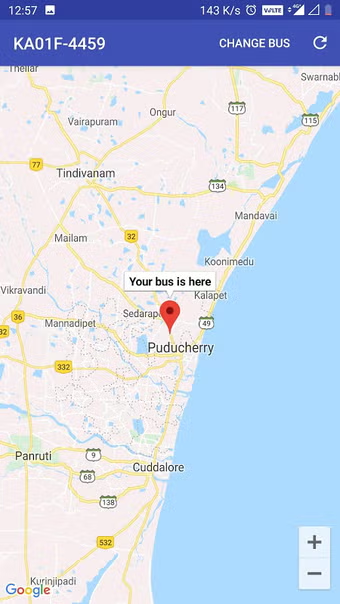
- Bus position on map
- Estimated arrival time (ETA)
- Distance from your stop
Step 6: Save Favorites
- Save frequently used routes
- Access them quickly later
Step-by-Step: How to Track Buses on iPhone (Using Chalo)
Step 1: Install Chalo
- Open Apple App Store
- Search for Chalo Live Bus Tracking
- Download and open the app
Step 2: Allow Location Permission
- Enable location for nearby route suggestions
Step 3: Select City / Region
- Choose your city or Kerala region (if prompted)
Step 4: Find the Bus or Route
- Search by route number or stop name
Step 5: Track Bus Live
- View the bus moving on the map
- Check ETA and delay indicators
Step 6: Enable Notifications
- Turn on alerts for arrival time changes or delays
How Live Tracking Improves Daily Commute
Live tracking is useful beyond casual travel.
Everyday Benefits
- Reduces waiting time at stops
- Helps plan office and college schedules
- Useful for parents monitoring children’s bus arrival
- Helps during traffic congestion or route diversions
- More reliable during early morning or late-night travel
Real-Time Info vs Timetable Schedules
| Feature | Timetable | Live Tracking |
|---|---|---|
| Based on schedule | Yes | No |
| Reflects traffic delays | No | Yes |
| Shows actual bus movement | No | Yes |
| Reliable during disruptions | No | Yes |
Live tracking gives a real-world picture, not just planned timings.
Tips for Best Tracking Experience
- Keep GPS turned on
- Use stable mobile data
- Save regular routes in the app
- Enable notifications for ETA changes
- Update the app regularly
Common Problems & Solutions
Bus not showing on map
→ GPS data may be unavailable for that route
Wrong bus number selected
→ Double-check route or stop name
Location not updating
→ Restart app or check mobile data
App showing offline
→ Poor network coverage; try again after some time
Safety & Privacy Considerations
- Location access is used only to show nearby routes
- Trusted apps do not store sensitive personal data
- Always download from official app stores
- Avoid unknown third-party tracking apps
Frequently Asked Questions (FAQs)
Is live bus tracking free?
Yes, these apps are generally free to use.
Does KSRTC officially support these apps?
They rely on available GPS and public transport data; coverage may vary by route.
What if live data is delayed?
GPS or network issues can cause delays; check timetable as backup.
Can I track buses in other cities?
Yes, many apps support multiple Indian cities.
Conclusion
Live bus tracking apps have made commuting simpler, smarter, and more predictable. For KSRTC passengers in Kerala, these apps help reduce waiting time, plan journeys better, and travel with confidence.
With easy installation and simple usage on both Android and iOS, real-time bus tracking is now accessible to everyone—from students and office-goers to tourists and daily commuters.