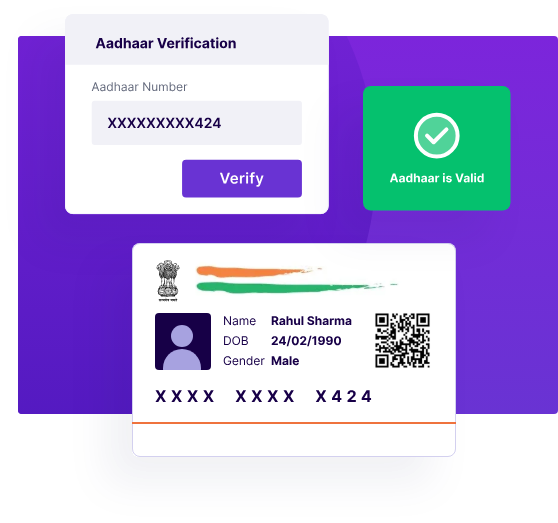
Losing an Aadhaar card is a common situation. The card may get misplaced, damaged, or unavailable when urgently required for banking, mobile SIM verification, or government services. Fortunately, the Government of India provides a secure and official way to access Aadhaar digitally.
Through services offered by UIDAI, citizens can instantly download Aadhaar PDF (also called e-Aadhaar) anytime using their registered mobile number. This online facility ensures that losing the physical card does not interrupt access to essential services.
What Is Aadhaar PDF (e-Aadhaar)?
Meaning of e-Aadhaar
Aadhaar PDF, officially known as e-Aadhaar, is a password-protected digital version of the Aadhaar card issued by UIDAI.
Legal validity of Aadhaar PDF
e-Aadhaar is legally valid and accepted at par with the physical Aadhaar card.
Difference between physical Aadhaar and e-Aadhaar
| Physical Aadhaar | Aadhaar PDF (e-Aadhaar) |
|---|---|
| Printed card | Digital, password-protected PDF |
| Can be lost/damaged | Can be downloaded anytime |
| Limited copies | Unlimited downloads |
Who Can Download Aadhaar PDF Online?
We can download Aadhaar PDF if we meet any of the following conditions:
- Aadhaar holder with a registered mobile number
- Users who know their Aadhaar number / VID / Enrollment ID
- Citizens who have lost the physical Aadhaar card
A registered mobile number is mandatory for OTP verification.
Official Website to Download Aadhaar PDF
The only official portal to download Aadhaar PDF is:
My Aadhaar Portal (UIDAI)
⚠️ We must strictly avoid third-party or private websites claiming Aadhaar download services, as they may misuse personal data.
How to Download Aadhaar PDF Instantly – Step-by-Step Guide
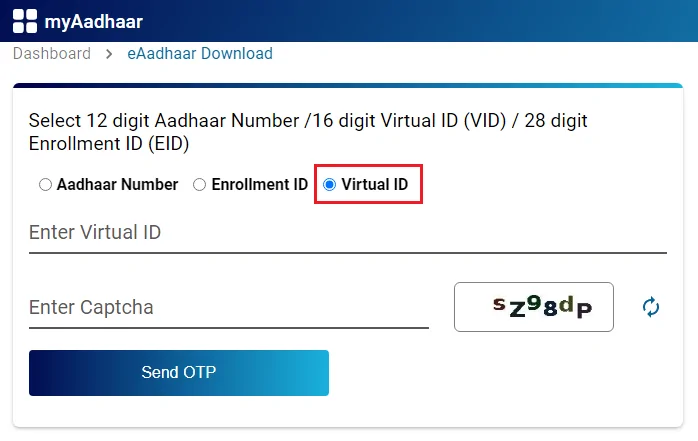
Follow these steps carefully to download Aadhaar PDF:
Step 1: Visit the official UIDAI Aadhaar portal
Open myaadhaar.uidai.gov.in in your browser.
Step 2: Choose “Download Aadhaar”
Click on the Download Aadhaar option.
Step 3: Enter Aadhaar Number / VID / Enrollment ID
You may use any one of these details.
Step 4: Complete captcha verification
Enter the security captcha displayed on the screen.
Step 5: Receive OTP on registered mobile number
Click Send OTP.
Step 6: Verify OTP
Enter the OTP received on your mobile phone.
Step 7: Download Aadhaar PDF
Click Verify & Download. The Aadhaar PDF will be downloaded instantly.
Password to Open Aadhaar PDF
The downloaded Aadhaar PDF is password-protected.
Aadhaar PDF password format:
- First four letters of your name (CAPITAL letters)
- Year of birth (YYYY)
Example:
Name: Ramesh Kumar
Year of Birth: 1992
Password: RAME1992
This Aadhaar PDF password ensures data security.
How to Download Aadhaar Without Aadhaar Number
If you do not remember your Aadhaar number, UIDAI still allows download.
Using VID (Virtual ID)
- Generate VID on UIDAI portal
- Use VID to download Aadhaar PDF
Using Enrollment ID (EID)
- Enter EID printed on Aadhaar enrolment slip
Retrieving Aadhaar Number
- Use “Retrieve Lost UID/EID” option on UIDAI website
- Aadhaar number is sent to registered mobile/email
Is Aadhaar PDF Valid Everywhere?
Yes. Aadhaar PDF is accepted for:
- Government services
- Banks and financial institutions
- SIM card verification
- Travel and identity proof (where Aadhaar is accepted)
As per UIDAI guidelines, e-Aadhaar has the same legal validity as the physical card.
Common Problems & Solutions
OTP not received
- Check mobile network
- Ensure the number is linked with Aadhaar
- Retry after some time
Incorrect mobile number
- Update mobile number at Aadhaar centre
PDF not opening
- Use the correct Aadhaar PDF password
Password error
- Ensure name spelling and birth year are correct
Important Safety Tips
- Never share Aadhaar OTP with anyone
- Use only UIDAI official website
- Store Aadhaar PDF securely on your device
- Lock Aadhaar biometrics if physical card is lost
These steps protect against identity misuse.
Frequently Asked Questions (FAQs)
Is Aadhaar PDF free?
Yes, downloading Aadhaar PDF is completely free.
Can we print e-Aadhaar?
Yes, printed e-Aadhaar is valid.
Can Aadhaar be downloaded multiple times?
Yes, there is no limit on downloads.
Conclusion
Losing a physical Aadhaar card is no longer a serious concern. With official UIDAI services, we can safely and instantly download Aadhaar PDF anytime using our registered mobile number. e-Aadhaar is secure, legally valid, and widely accepted across India. We strongly recommend all citizens to rely only on UIDAI portals, store their Aadhaar PDF securely, and avoid unofficial websites for Aadhaar-related services.